Register
-
From the provided URL select REGISTER/LOG IN from the left corner of the page
-
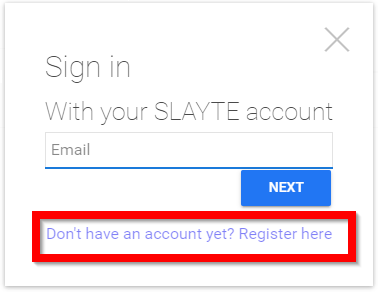
Click on Don't have an account yet? Register here
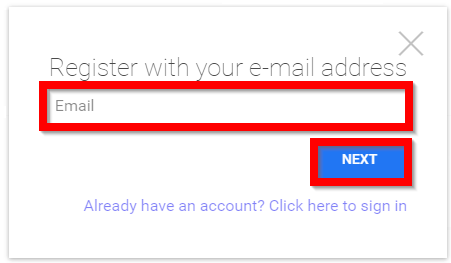
- Type in your email address then select NEXT
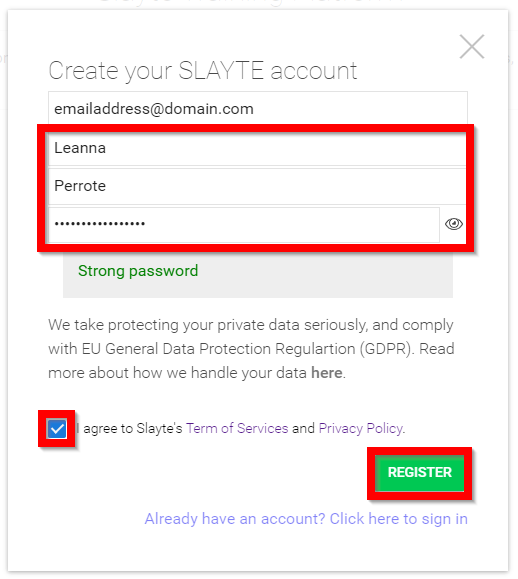
- Complete the following
- Enter in your First name
- Enter in your Last name
- Enter in a strong password
- Agree to Slayte's Term of Services and Privacy Policy
- Select Register when done
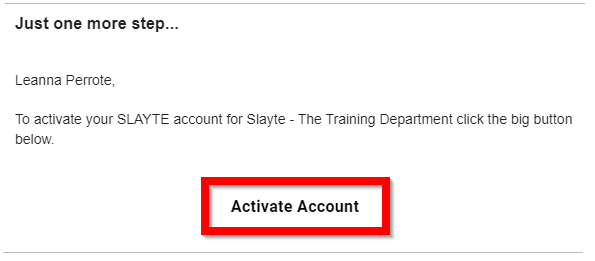
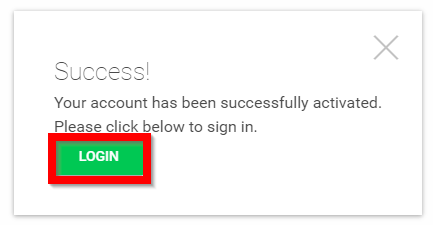
- Go to your email account and select Activate Account
- Select Login
Related Articles
Register
From the provided URL select REGISTER/LOG IN from the left corner of the page Click on Don't have an account yet? Register here Type in your email address then select NEXT Complete the following Enter in your First name Enter in your Last name Enter ...Register an Application
From the Home page, navigate to the left panel and click Competitions, or select the Competition tile. Click on the Category tile that contains the desired competition. A list of available competitions within the selected category will be displayed. ...Traditional Log In
From the provided URL select REGISTER/LOG IN from the left corner of the page Type in your email address then select NEXT Type in your password then select LOGIN You will be redirected to the Home screenTraditional Log In
From the provided URL select REGISTER/LOG IN from the left corner of the page Type in your email address then select NEXT Type in your password then select LOGIN You will be redirected to the Home screenTraditional Log In
From the provided URL select REGISTER/LOG IN from the left corner of the page Type in your email address then select NEXT Type in your password then select LOGIN You will be redirected to the Home screen